
How Kilian Muster Created an Entire TV Show, Phungus & Mowld, in His Spare Time Using MOHO - Featured Artist (Webinar Replay)
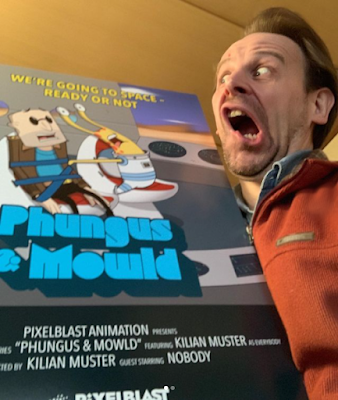
Phungus & Mowld One Sheet with Creator Kilian Muster.
Phungus & Mowld One Sheet
with Creator Kilian Muster.
Photo: @kilianmuster
Readers of this blog will know I swear by Reallusion's Cartoon Animator as the best animation tool for teams of just one person but Moho, by Lost Marble, is easily a contender and, for many, a superior tool feature for feature.

Recently Lost Marble hosted a free, behind the scenes, one hour webinar with independent animator, and one person team, Killian Muster, creator of the Moho animated TV Series Phungus & Mowld, a Sci-fi comedy influenced by shows like Rick & Morty and Family Guy

Below is both a preview of what to expect from the series, and the good news that Moho was reacquired by it's original creators back in 2020 (definitely great news that was worth celebrating with an animation).


Killian first started using Moho back in 2001 to create an animated TV commercial, and then for smaller side jobs. He had put his interest in film, storytelling, and animation on the backburner for several decades, working as a designer in many fields. In 2019 he reignited his interest in in animation, creating Phungus & Mowld in his spare time. The pilot episode went on to win several awards at various film festivals.

Initially I thought Killian's webinar replay (embeded below) would be interesting because you could easily do the same thing with Cartoon Animator (or any other animation software). There is always something to be learned from anyone producing TV quality animation all by themselves, in their spare time, while supporting a family and working a full time job.

However, on another level, it's a great insight into what animating with Moho is like in comparison to whatever application you've settled upon. It's even great if Moho is your application of choice since you get to compare your process with someone else.

Personally I've spent a lot of time learning Moho 12. Documenting my process in this blog and going so far as to sort all of Moho's official, free, animation tutorial videos into a logical order that makes sense to a beginner. As a result, I'm very informed on what Moho is capable of in comparison to Cartoon Animator. Ultimately I just didn't find using Moho to be as 'fun' as Cartoon Animator.

On the other hand, Killian appears to have taken a similar journey to me through many different applications including; Animate CC, Toon Boom Harmony, Blender's Grease Pencil, and Cartoon Animator. For him Cartoon Animator is better suited to 'explainer videos' (which is a fair assessment on a surface level). He just kept coming back to Moho.

Below is the FREE 1-hour webinar with Kilian in which he talks about his workflow of creating an independent animated series as a one-man operation using Moho. Specifically he covers:
  • His script writing process.
  • How he puts together scenes.
  • Details various character rigs he has created over time. 
  • Q&A session.


Some key points I took away from this webinar include:
  • Killian had to teach himself how to write scripts and how to animate again with MOHO. Toward the end of the webinar he recommends several Moho learning resources.
  • Doesn't storyboard because he doesn't really need to being a one person team. Instead he places his characters in each scene and then uses the camera to frame his shots - which he tends to do after he's animated the characters.
  • Likes that characters are vector based making them easy to scale.
  • Likes the very versatile rigging system which takes full advantage of vector based characters.
  • Moho's physics animation features save him time with more complex effects.
  • Uses Affinity Designer for backgrounds rather than draw them directly in Moho because it's easier to update a background across a project by updating the background file and having Moho auto update all the scenes where it is used.
  • When animating he starts with the voice audio and does all the lip syncing before animating anything else.
If you would like to know more about Killian and his work visit his PixelBlast Creative website where you can access his production blog and links to other information including his new series Shadywoods.

For more information about Moho, visit: www.mohoanimation.com

Popular posts from this blog

Eight 2D Animation Apps For Your Phone or Tablet Mobile Device

M obile productivity apps have become so capable that they can be great alternatives to their PC/MAC equivalents or serve as great tools in their own right when you're away from your desk. While some apps simply mimic their desktop counterparts, others offer well thought out, touch-friendly interfaces that are easier and more fun to use. Every so often I check out what's available for 2D animation for Android devices, since that's what I use, that can complement my workflow with Reallusion's Cartoon Animator 5. Some may be available for Apple devices as well. Below I've listed six free (F) apps (with optional paid (P) upgrades) on the Google Play Store that you might want to explore. Some are just fun apps on their own while others may be useful as part of your workflow on bigger animation projects. Not all are exclusively animation apps and could be used on any production. JotterPad (F/P) The name JotterPad makes this sound like a notepad application but it's ...

Custom Animate Your Christmas Messages in Minutes Using Any Character Image with Good Quality Lip Sync

B ack in December of 2023 I created a video showing you how to quickly  Make a Festive Animated YouTube/TikTok Short! , about 18 seconds in length, using Cartoon Animator and ElevenLabs for a pretty good, AI generated Santa voice. The resulting Christmas message actually took me a couple of hours to create despite the tutorial video only being around 30 minutes. Create Comparable Animations in Minutes with Generative AI  Fast forward a couple of years and you can create easily comparable 2D animations with any number of image to video generative AI sites that also support audio and lip syncing. Some of the best can do full body animation, music, and character voices all in the one prompt. I particularly recommend OpenArt AI as your all in one AI tool for advanced generative AI. However if you want something that can just animate a pretty great, talking head image with lip sync, that doesn't require a lot of noodling around to find and learn all the settings, then LipS...

Inochi2D - Free Open Source 2D VTuber Avatar Rigging and Puppeteering Software (Part 1)

Inochi2D Creator - Free Open Source VTuber Software. If you've been looking for a way to live perform as a 2D cartoon avatar on camera, whether it be for a live stream or for pre-recorded content like educational videos, then VTuber software is a low cost (or even no cost) option worth looking into. In my previous post, How to Become a VTuber - 2D and 3D Software for Creating and Controlling Your Avatar , I took a brief look at the relatively new but completely free and open source Inochi2D  which I thought showed great potential for my own needs of creating a live performance character rig for my own TET Avatar that I use for all my promotional materials. While it is possible to live perform my character using Cartoon Animator itself, Reallusion's MotionLive2D capture system isn't great - with lip sync in particular. More importantly though, I can't exactly teach people how to use Cartoon Animator if I'm using Cartoon Animator to control my Avatar. What is Inochi2D...

OpenArt Versus Dzine: AI Consistent Character Training Compared

TET2d Avatar Image created with Dzine . R egular readers of Animation and Video Life will be familiar with my alter ego, 2D avatar character, TET, who is both the face of The Lazy Animator Cartoon Animator Tutorials, and is currently part of my Resident Dragon joke cartoon series. It is my goal to use him as an animated avatar for both my Lazy Animator video courses and my Cartoon Animator tutorials that you'll find on my @AnimLife YouTube channel . Unfortunately I don't have the time to animate him for every single project. Even with Cartoon Animator's time-saving workflow I wouldn't be able to produce animated content quick enough. Which is why advances in AI animation is something that is increasingly more interesting to me each day. Consistent Characters Before we get there I have to overcome one of the biggest hurdles in AI I've come across... reproducing my art style consistently. I don't want an approximation of my characters, I want my characters looki...

Moho 14 Released - Still the Best 2D Animation Software for Indy Animators on a Budget

Moho 14 Released. Regular readers know I am a Reallusion, Cartoon Animator advocate through and through. Hands down I would recommend Cartoon Animator 5 first over Lost Marble's Moho 14 to anyone who is just starting in 2D animation, is a team of one, or just needs to animate as quickly as possible. However, feature for feature, Moho is, arguably, the best 2D animation software for the rest of us who can't justify a Toon Boom Harmony , or Adobe Creative Cloud subscription (and even with their applications Moho is very competitive on features). You can get started with Moho Debut for just USD$59.99 which is a cut down version of Moho Pro but it still has the most essential features needed for 2D animation. While Moho Pro is a whopping USD$399.99 (Cartoon Animator, which only has one version, is just USD$149.00) upgrades to new version numbers come down to a quarter of the price at USD$99.00. Even though Reallusion just released features like Motion Pilot Puppet Animation and...

Can a Solo Animator Make an Animated Feature Film or TV Series?

Series Creation Tip: If this is your first attempt at a series start small with two to four main characters and two or three sets that you can reuse each episode. My new series in development, Resident Dragon has four characters and is set in a suburban home. Recently I was asked if a solo animator could make a feature film? The short answer is 'YES'. Logically, with enough time, you can achieve anything. The very next question I was asked is how long do I think it would take and could it be done within a year? My initial answer was, it depends on the skill of the creator, noting that a Disney feature film takes a minimum of (I'm only guesstimating here) three to five years, based on when a movie is announced to when it actually gets released, with thousands of people working on it. Which implies that a single person trying to do the same thing may take the best part of a lifetime to make just one animated feature film. However is this really the case? Let's be clear, ...

The Ultimate Independent Animator's App and Resource List - Animation and Video Life

Image created with Cartoon Animator 4. Being an independent animator is not like a studio animation job. There's so much more to do that is indirectly related to the actual task of animating. Over the years I've sought out many apps, tools, and services that can help me achieve that one single task, expressing myself through animation. Below is my Ultimate Independent Animator's Resource List for 2024 (last updated Oct 2024). It started out as a list of free or low cost apps that could help you in every stage of producing either 2D or 3D animation, and then just kind of grew from there. You may not have been looking for a Time Management App as much as you needed something to get you started in 3D animation but when those commissioned projects start coming in you'll have a head start on maximizing your time. All the apps and services on this list had to meet two main criteria: They had to be useful and relevant to an Indy Animator/artist. The base app/se...