
Inochi2D - Free Open Source 2D VTuber Avatar Rigging and Puppeteering Software (Part 1)

Inochi2D Creator with one of the demo avatars.
Inochi2D Creator - Free Open Source VTuber Software.

If you've been looking for a way to live perform as a 2D cartoon avatar on camera, whether it be for a live stream or for pre-recorded content like educational videos, then VTuber software is a low cost (or even no cost) option worth looking into.

In my previous post, How to Become a VTuber - 2D and 3D Software for Creating and Controlling Your Avatar, I took a brief look at the relatively new but completely free and open source Inochi2D which I thought showed great potential for my own needs of creating a live performance character rig for my own TET Avatar that I use for all my promotional materials.

While it is possible to live perform my character using Cartoon Animator itself, Reallusion's MotionLive2D capture system isn't great - with lip sync in particular. More importantly though, I can't exactly teach people how to use Cartoon Animator if I'm using Cartoon Animator to control my Avatar.

What is Inochi2D and is it Easy to Learn?

Inochi2D, which is still a beta release at version 0.8 is actually two applications, Inochi2D Creator (for rigging), and Inochi2D Session (for performing/puppeteering your avatar).

Mannequin Anime Character Creator.
Mannequin Character Creator.
Download the free version here.
Initially you might look at Inochi2D and think that's just for Anime VTuber Avatars but you can rig any art style of 2D character. It's definitely BYO art. However, if you really like Anime Avatars, but can't draw yourself there is a low cost 2D Anime character creator called Mannequin that can export characters for use with Inochi2D Session (bypassing rigging in Inochi2D Creator altogether).

Fair warning, if you're interested in trying Inochi2D for yourself be prepared to read the official documentation carefully and study the example character rigs closely. Particularly the full character rigs that come with the software. As well there is a really useful and comprehensive unofficial documentation here

I also watched VTuber, Dragonnator96's video, How To Rig a VTuber Model with Inochi2D (0.7.4.1 Creator and 0.5 Session), so many times because it really is the only video tutorial I could find that sort of explains the whole process (though definitely study the official rigs and documentation because Dragonnator96 definitely doesn't rig her avatar the same way).

Inochi2D Creator is not necessarily hard to learn but it's not easy either thanks to its lack of a step by step guide through the entire process of creating a character and performing it. (I'm very tempted to write my own video tutorial now I'm almost through the other side of figuring everything out).

Can You Use Cartoon Animator Character Templates With Inochi2D?

The short answer is no, however you can extract what you need from them into a template suitable for rigging in Inochi2D Creator.

Hair Rigging of my TET Avatar in Inochi2D Creator.
Hair Rigging of my TET Avatar in Inochi2D Creator. Generally it's better to split
your front hair into left and right sides in Inochi2D but I'm lazy!


The general method is to place all you sprites onto individual layers in a PSD file using a top down approach i.e. layered in the general order they will display in the finished character with no hidden layers.

For a Cartoon Animator based template you'll want to extract all your body sprites, including all your hand sprites. You'll also want all your face and hair sprites. Particularly make sure you keep the iris, eye white, and eye mask sprites because these can definitely be used to rig the eyes to work similarly to how they would in Cartoon Animator.

You'll also want your mouth sprites too - just in case. In a Vtuber Avatar rig all mouth movement is usually done by deforming the lip sprites in front of a mouth interior sprite. However, as I'm writing this, I'm trying to come up with a way to rig your existing 15 standard, required mouth sprites that all Cartoon Animator characters have so you don't have to create any new sprites in this process.
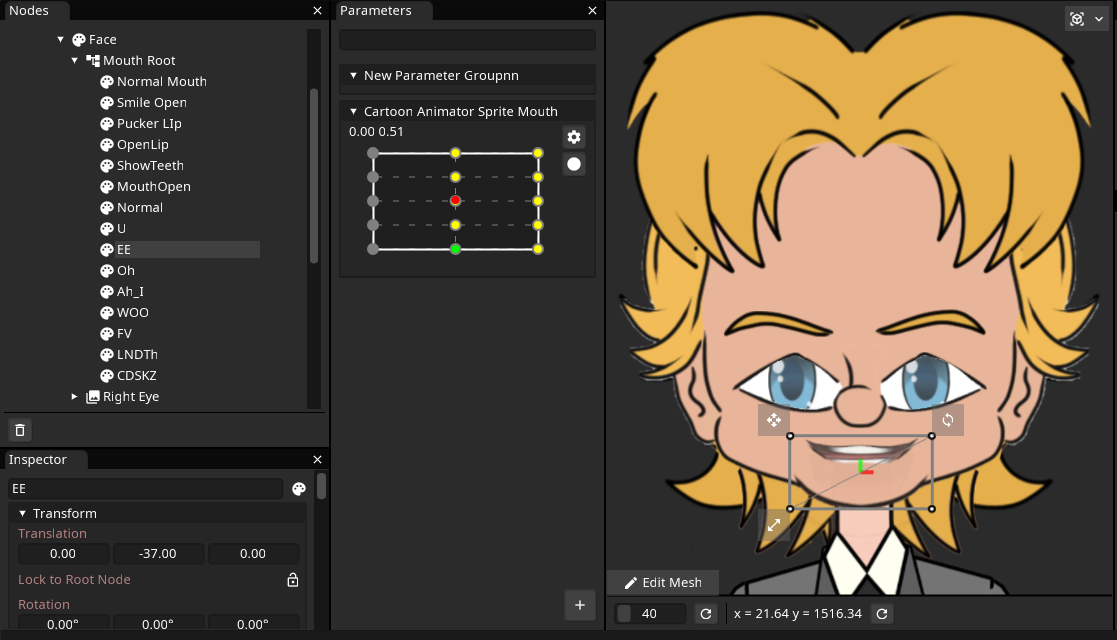
Creating a Mouth Matrix of Cartoon Animator Mouth Sprites.
Above you can see all my Cartoon Animator mouth sprites in the rig, listed on the left.
In the middle, in that matrix of dots, yellow and green dots represent a different mouth sprite to be displayed. If you slide the red dot around, the dot it is nearest is the mouth that will be displayed on the rig. At the moment it crossfades between mouths but I'm sure it's possible to just switch directly. I just haven't quite worked that out yet.


Inochi2D supports masking, blend modes, lighting effects, and physics, so if you're a fan of Spring Bones in Cartoon Animator, you can do things like make hair automatically move when the character moves their head.

I believe there's also the ability in version 0.8 to create auto animations that keep your character moving when you're not actively puppeteering it yourself.

I'm Still Learning...

I really wanted to have my TET rig done so I could step you through my process and show an actual demo but I'm still learning Inochi2D Creator. Specifically cracking how to do the mouth movement by switching sprites instead of using deformations.

I think the developers of Inochi2D really have something here so I didn't want to throw my hands in the air and say it's all too hard. Plus the demo Avatars are really impressive. Way beyond what I need my own TET Avatar to do.

That's why I've decided to turn this into at least a two part series. I think Inochi2D and Cartoon Animator could be a good pipeline for those of us looking to live perform our characters at least some of the time without having to invest in expensive motion capture software and hardware. 

Next time I'll, hopefully have my TET Avatar rigged so I can give you an overview of that process, and then I'll be able to focus more on Inochi2D Sessions to see how that performs alongside Cartoon Animator.

Comments

Post a Comment

This blog is monitored by a real human. Generic or unrelated spam comments with links to sites of dubious relativity may be DELETED.

I welcome, read, and respond to genuine comments relating to each post. If your comment isn't that save me some time by not posting it.

Popular posts from this blog

Eight 2D Animation Apps For Your Phone or Tablet Mobile Device

M obile productivity apps have become so capable that they can be great alternatives to their PC/MAC equivalents or serve as great tools in their own right when you're away from your desk. While some apps simply mimic their desktop counterparts, others offer well thought out, touch-friendly interfaces that are easier and more fun to use. Every so often I check out what's available for 2D animation for Android devices, since that's what I use, that can complement my workflow with Reallusion's Cartoon Animator 5. Some may be available for Apple devices as well. Below I've listed six free (F) apps (with optional paid (P) upgrades) on the Google Play Store that you might want to explore. Some are just fun apps on their own while others may be useful as part of your workflow on bigger animation projects. Not all are exclusively animation apps and could be used on any production. JotterPad (F/P) The name JotterPad makes this sound like a notepad application but it's ...

The Ultimate Independent Animator's App and Resource List - Animation and Video Life

Image created with Cartoon Animator 4. Being an independent animator is not like a studio animation job. There's so much more to do that is indirectly related to the actual task of animating. Over the years I've sought out many apps, tools, and services that can help me achieve that one single task, expressing myself through animation. Below is my Ultimate Independent Animator's Resource List for 2024 (last updated Oct 2024). It started out as a list of free or low cost apps that could help you in every stage of producing either 2D or 3D animation, and then just kind of grew from there. You may not have been looking for a Time Management App as much as you needed something to get you started in 3D animation but when those commissioned projects start coming in you'll have a head start on maximizing your time. All the apps and services on this list had to meet two main criteria: They had to be useful and relevant to an Indy Animator/artist. The base app/se...

Can a Solo Animator Make an Animated Feature Film or TV Series?

Series Creation Tip: If this is your first attempt at a series start small with two to four main characters and two or three sets that you can reuse each episode. My new series in development, Resident Dragon has four characters and is set in a suburban home. Recently I was asked if a solo animator could make a feature film? The short answer is 'YES'. Logically, with enough time, you can achieve anything. The very next question I was asked is how long do I think it would take and could it be done within a year? My initial answer was, it depends on the skill of the creator, noting that a Disney feature film takes a minimum of (I'm only guesstimating here) three to five years, based on when a movie is announced to when it actually gets released, with thousands of people working on it. Which implies that a single person trying to do the same thing may take the best part of a lifetime to make just one animated feature film. However is this really the case? Let's be clear, ...

Create 2D Animated Characters with 3D Character Creator Tools and Artistic Filters

3D CC3 TET Character, based on my Oppa Doll Avatar, used as the base for a 2D CA4 character. One of my favorite things to do is to create characters with any type of Avatar/Character creator app. In fact the first test I usually try with these tools is, can I make an avatar of me (or at least my The Extraordinary Tourist persona). Previously I've used 2D character creators like Oppa Doll as a source of artwork for some characters I've made for Reallusion's Cartoon Animator 4 animation studio but 2D character creators are limited to... well 2D. 3D Character Creators While you may think 3D character creators have no place in creating characters for 2D animation there are quite a number of advantages including: No drawing skills required. Render characters in any style. Use an art filter or even hand trace into line art. Need to animate the character in a specific pose or angle? Render out an image of the character in the required angle and animate it in 2D. Quicker to crea...

Jarrad Wright, The Big Lez Show - Who Would've thought Animating with MS Paint Could Take You So Far?

A friend of mine recommended I should check out The Big Lez Show after I mentioned to him I make animations for living. He said the show's creator, Australian animator, Jarrad Wright , just makes episodes from his home using MS Paint. Somewhat shamefully I hadn't heard of The Big Lez Show, but the fact that it was being made with MS Paint absolutely hooked me into checking out. If you've never heard or seen the show then you, like I was, are probably thinking how good could it be? MS Paint has kind of a cult following of hardcore animators but no one would use it as their primary animation tool on a series, right? WARNING - before going any further, you need to know The Big Lez Show and its humor contains some pretty strong language. By strong I mean it's peppered very liberally with the 'F' and 'C' words and is very every day Aussie, blue collar speak. Unapologetically, all of that, is part of why it's so good. There's a good chance you've...

Wonder Unit Storyboarder - Free Storyboarding Software for People Who Can (or Can't) Draw

Wonder Unit Storyboarder.  As an independent and solo animator I'm always tempted to try and skip storyboarding my animated shorts because they're usually only single scene sketch comedy type jokes. As a result I have many unfinished projects that kind of petered out due to having no clear finishing line. Storyboarding your productions, no matter how small, gives you a step by step guide of every shot that needs to be completed (no planning shots as you animate). It also allows you to create an animatic that gives you a rough preview of the finished production. In short, you shouldn't skip storyboards as they, generally, increase the chance of the project being completed. Disclaimer - I'm Not a Fan of Storyboarder Upfront, Wonder Unit's Storyboarder  is not my preferred storyboarding software. However it's completely free, has a number of very compelling featu...