LunaPic - Free, One Click Effects and Animations for Your Images and Animated Projects

Tiny World Effect - LunaPic.
There are many different, free, graphic and photo image editors out there, I particularly recommend Krita as an all in one, free graphics tool. However if you want something online, browser based, and connected to a bunch of sites you probably use that can apply a wide range of filters, artistic, and animation effects with one click, LunaPic is well worth looking into.

It's two key features, in my opinion, are:
  1. So many different effects, filters, and animations, I kept getting distracted from writing this article trying many of them out. I lost hours of time and still barely scratched the surface. There is everything from automatic background removal to templates for turning your images into motivational posters. Not to mention a good selection of animation effects too, from converting an MP4 file to an animated GIF file, through to adding animated water effects to an image.
     
  2. Quite a number of the effects are one click to apply, with a single slider to adjust the strength of the effect. It's for this reason alone I kept getting distracted. Since, for many effects or filters, there's no complex settings to learn, I kept going in and selecting an effect just to see what it did (and I didn't even need to since for many menus you can bring up a page of thumbnails showing the results of each filter/effect).
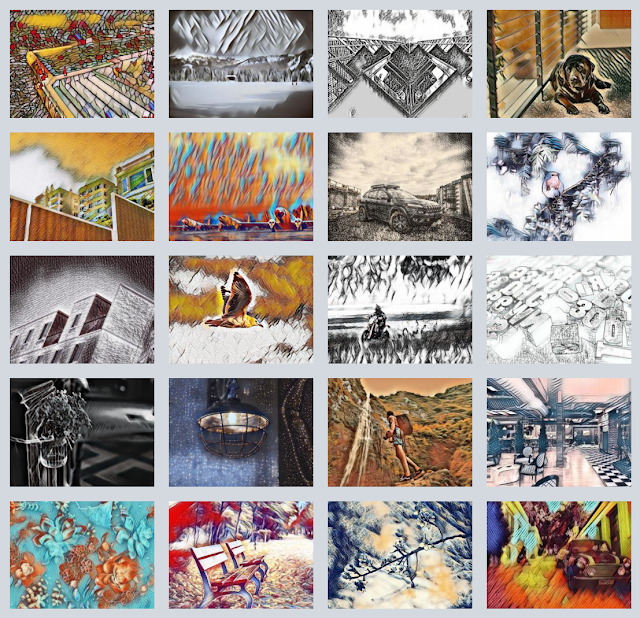
A selection of some of LunaPic's many Art Filters.
A selection of some of LunaPic's
many art filters.

LunaPic works on both desktop and mobile devices making it convenient to use almost anytime and anywhere. While you can upload images to it from several different sources a nice addition is to also open images simply by entering an image URL.

There's really too many effects and options to review. In terms of using it as part of your animation workflow, my main thought was, it would be a very good way to give you animations a unique and unified artistic style. Simply apply a filter to all of your graphics and go from there. Definitely worth experimenting with.

Of course it's also a quick way to add some really interesting animation effects into your scene quickly as I demonstrate below.

Applying a Water Reflection Animation to a Cartoon Animator Project
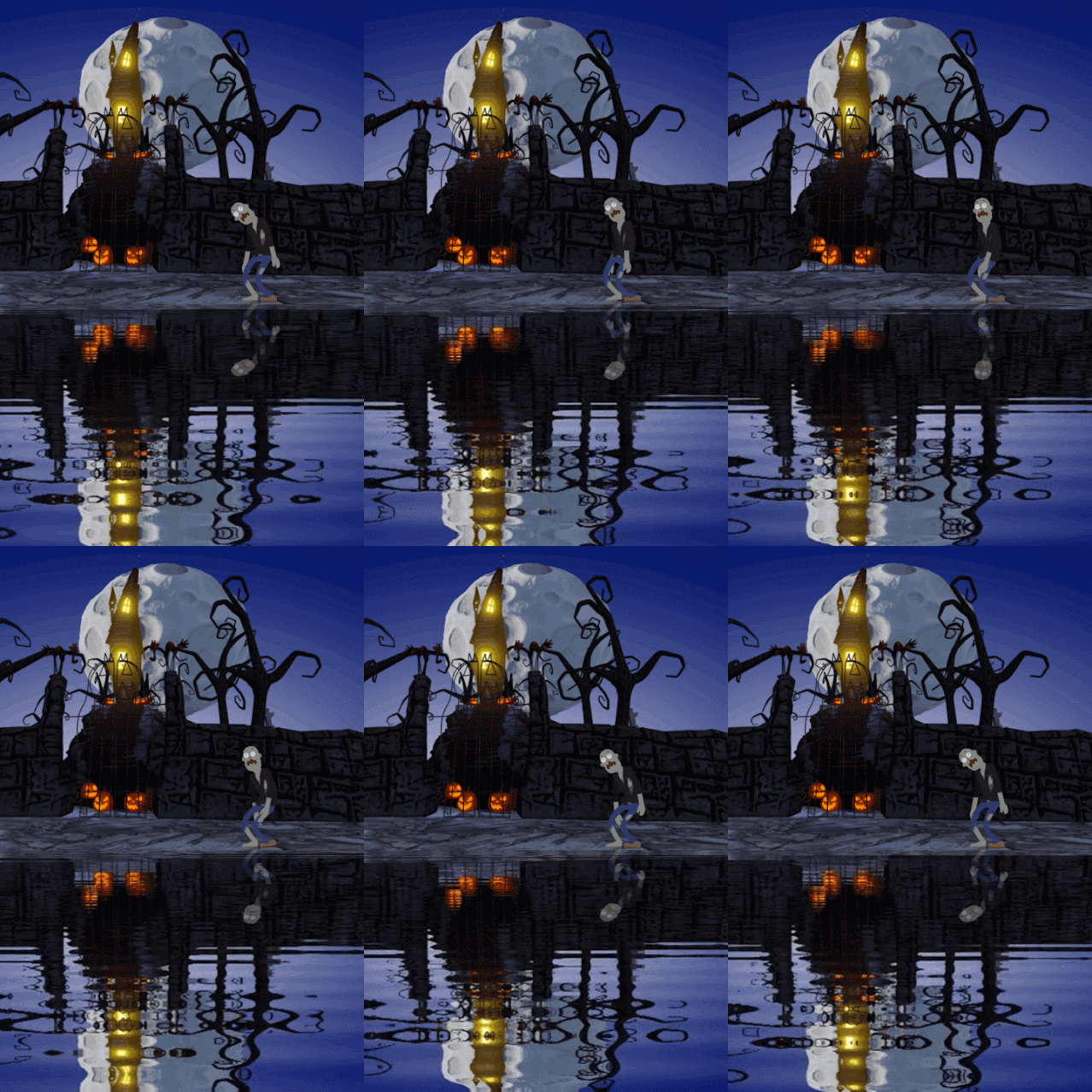
Animation of a Zombie Reflected in water standing in front of a castle.
To inspire you a little more to check out LunaPic I created this short, looping animation of  a zombie standing in front of a lakeside castle. The animated lake was created entirely in LunaPic.

Creating this scene, I exported a single image of my complete background scene (Nightmare by Dave Art) and uploaded it to LunaPic.

Next I applied the Reflecting Water effect from the Animation menu.

I then cropped the image so I just had the actual reflecting water part of the animation using the Simple Crop Tool from the Edit menu.

To save the image as an MOV video file I selected More Options from the links below the image (last link on the right) which gave me more save options. I selected Save as MOV (Movie).

With my water reflection video file, I simply dragged this onto my scene, on the stage, in Cartoon Animator, and imported as a Prop when prompted.

The Zombie character (from Reallusion's All Hallows' Eve Pack) I added afterward and applied a standing tired motion.
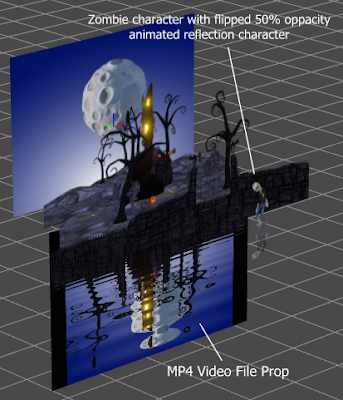
3D view showing the structure of my scene in Cartoon Animator.
3D view showing the structure of
my scene in Cartoon Animator.
I then duplicated the zombie and vertically flipped it so it would mirror the original character and movement.

To finish off I reduced the brightness of both zombies by -20 using the Render Style menu, then reduced the opacity of the reflection zombie by 50% so the ripples of the water would at least show through even if the reflection itself wasn't rippling like the rest of the scene reflection.

---o ---o--- o---

LunaPic won't replace your preferred graphics editor since it is limited in the file types it can edit. However it is a very handy online app to have, considering how simple it is to use, and how much it can add to your creativity without too much extra effort.
 

Comments

Post a Comment

This blog is monitored by a real human. Generic or unrelated spam comments with links to sites of dubious relativity may be DELETED.

I welcome, read, and respond to genuine comments relating to each post. If your comment isn't that save me some time by not posting it.

Popular posts from this blog

Eight 2D Animation Apps For Your Phone or Tablet Mobile Device

M obile productivity apps have become so capable that they can be great alternatives to their PC/MAC equivalents or serve as great tools in their own right when you're away from your desk. While some apps simply mimic their desktop counterparts, others offer well thought out, touch-friendly interfaces that are easier and more fun to use. Every so often I check out what's available for 2D animation for Android devices, since that's what I use, that can complement my workflow with Reallusion's Cartoon Animator 5. Some may be available for Apple devices as well. Below I've listed six free (F) apps (with optional paid (P) upgrades) on the Google Play Store that you might want to explore. Some are just fun apps on their own while others may be useful as part of your workflow on bigger animation projects. Not all are exclusively animation apps and could be used on any production. JotterPad (F/P) The name JotterPad makes this sound like a notepad application but it's ...

Inochi2D - Free Open Source 2D VTuber Avatar Rigging and Puppeteering Software (Part 1)

Inochi2D Creator - Free Open Source VTuber Software. If you've been looking for a way to live perform as a 2D cartoon avatar on camera, whether it be for a live stream or for pre-recorded content like educational videos, then VTuber software is a low cost (or even no cost) option worth looking into. In my previous post, How to Become a VTuber - 2D and 3D Software for Creating and Controlling Your Avatar , I took a brief look at the relatively new but completely free and open source Inochi2D  which I thought showed great potential for my own needs of creating a live performance character rig for my own TET Avatar that I use for all my promotional materials. While it is possible to live perform my character using Cartoon Animator itself, Reallusion's MotionLive2D capture system isn't great - with lip sync in particular. More importantly though, I can't exactly teach people how to use Cartoon Animator if I'm using Cartoon Animator to control my Avatar. What is Inochi2D...

Wonder Unit Storyboarder - Free Storyboarding Software for People Who Can (or Can't) Draw

Wonder Unit Storyboarder.  As an independent and solo animator I'm always tempted to try and skip storyboarding my animated shorts because they're usually only single scene sketch comedy type jokes. As a result I have many unfinished projects that kind of petered out due to having no clear finishing line. Storyboarding your productions, no matter how small, gives you a step by step guide of every shot that needs to be completed (no planning shots as you animate). It also allows you to create an animatic that gives you a rough preview of the finished production. In short, you shouldn't skip storyboards as they, generally, increase the chance of the project being completed. Disclaimer - I'm Not a Fan of Storyboarder Upfront, Wonder Unit's Storyboarder  is not my preferred storyboarding software. However it's completely free, has a number of very compelling featu...

The Ultimate Independent Animator's App and Resource List - Animation and Video Life

Image created with Cartoon Animator 4. Being an independent animator is not like a studio animation job. There's so much more to do that is indirectly related to the actual task of animating. Over the years I've sought out many apps, tools, and services that can help me achieve that one single task, expressing myself through animation. Below is my Ultimate Independent Animator's Resource List for 2024 (last updated Oct 2024). It started out as a list of free or low cost apps that could help you in every stage of producing either 2D or 3D animation, and then just kind of grew from there. You may not have been looking for a Time Management App as much as you needed something to get you started in 3D animation but when those commissioned projects start coming in you'll have a head start on maximizing your time. All the apps and services on this list had to meet two main criteria: They had to be useful and relevant to an Indy Animator/artist. The base app/se...

Koolmoves Tutorials for GoAnimate - Parts 1 and 2

Quite a few people on GoAnimate have asked me to make a Koolmoves tutorial for creating flash props and characters suitable for use with the GoAnimate Studio. Well that day is finally here with this series of four videos that will give you more than enough learning to at least be making your own flash props - and will give you a kick start for animating characters too. Tutorial 1 The first video will step you through the process of setting up a template file suitable for using as a starting point for all your flash props and backgrounds. More than that, the way the template is set up is exactly how you need it for creating your own GoAnimate Community Characters - a feature that is currently only available to GoAnimate Beta Users but, if GoAnimate makes it widely available, you'll be ready. The tutorial finishes with showing how to upload your flash props/backgrounds/characters etc. into the GoAnimate Studio. Tutorial 2, Part 1 In part 1 I show you how to import a trace i...

Follow Me As I Build My Two Cartoon Web Series So You Can Build Your Series Too

Bat Storm and TET from Resident Dragon, Behind the Scenes on these two series. Image by Gemini AI and TET. M any cartoonists, authors, short story writers, and other types of creators find themselves aspiring to make an animated cartoon web series because, although a challenging task, it's seen to be achievable by a team of one. You don't need a big studio, a killer pitch, or a big budget, (which would all be nice) you can just start making something yourself, in your spare time, on a shoe string budget. That's what this blog, going forward, will be focusing upon. I'm going to document the behind the scenes on how I'm making my two web series, which will hopefully inspire you to say, if he can do this with almost no budget, then maybe I can too. Along the way I plan to create guides and tutorials, so you aren't just seeing behind the scenes, you also have the option of following some of my processes step by step. Full disclaimer. This is just my process. I'm...

Prome AI Sketch Render Tool - Your Tradigital Clean Up and Colorist Artist for Character and Background Design

Random character head, Biro sketches drawn by TET (left). Render by PromeAI (right) using Prome's Sketch Render tool set to 'Comon:Cartoon, Render Mode: Outline'. W hile I don't do New Year Resolutions, one of my plans for the year ahead is to do more of my own art. Specifically character design drawn in an actual, physical sketchbook.  To that end, I have been spending the last half hour of most days drawing a page or two of random biro sketches in my sketchbook and posting the pages to my Instagram account  (this link will take you to one of my posts). These sketches are mostly practicing my skills because I don't really draw regularly anymore. Here is a tip, if you do this kind of sketching, and push yourself to keep doing it, you will see many drawings that could be taken further, even if you don't have anything they're suited for just at the moment. Which is where my second favorite AI Image Tool (after Leonardo.ai )  PromeAI comes into play. PromeAI ...